FTDX10 CAT Control Problem Solved!

Following on from my article about the issues I had with the Silicon Labs VCP/USB to Serial driver that’s required to be able to use the CAT controls on the FTDX10 via the USB connection I decided to take a different approach to the problem.

Since the driver was incompatible with something that is already installed on my MacBook Pro (Most likely Virtualbox) and rendered the computer unusable I decided to search for a USB to Serial converter that worked with Apple computers without the need for proprietary drivers.

It didn’t take long to find a suitable adapter, the Sabrent USB 2.0 to Serial (9-Pin) available on Amazon uses the FTDI chipset that is natively supported by Apple MacOS without the need for proprietary drivers to be installed. This makes it a simple plug and play adapter.

Unfortunately both the adapter and the FTDX10 have a male DB9 connector and so a female to female DB9 adapter is also required to make the connection.

Connecting the DB9 to the FTDX10, setting the RS232 port to 38400 on the radio and within the WSJT-X software I soon had control of the radio from the MacBook Pro.

To get the sound from the radio to the MacBook all I needed to do was connect the USB lead into the back of the radio and into the 2nd USB port on the MacBook. Since the sound card in the FTDX10 is supported natively by MacOS 11.6.2 (Big Sur) without the need for the Silicon Labs driver, this completed the setup.

So I now have full digital modes and rig control without installing any proprietary drivers on my MacBook Pro.

I tested the setup using FT8 on 30m this afternoon, it worked seamlessly.

Problem solved!

Silicon Labs VCP Driver for FTDX10 CAT Control Issues

To get my MacBook Pro talking to the Yaesu FTDX10 CAT controls so that I could use WSJT-X and FT8 I had to install the Silicon Labs CP210x VCP Driver so that it recognised the USB to Serial connection within the radio. This initially worked well however, over time I found my MacBook Pro started misbehaving.

Silicon Labs CP210x Macintosh OS VCP Driver v6 Release

The problem I had was that the MacBook Pro would wake from sleep but, the screen wouldn’t come on. The same issue occurred when booting the MacBook Pro from cold, the machine would boot but, the screen wouldn’t come on. Sometimes the screen would flicker during a cold boot and then eventually stay on, only to go off again permanently if the MacBook went to sleep.

I uninstalled the driver but, the problems continued. After much investigation the only thing left was to reinstall MacOS Big Sur.

Fortunately the way MacOS is configured, it’s possible to reinstall the O/S without losing any of the applications and data, a great relief for sure. I do have a Time Machine backup just incase though!

MacOS reinstalled and stability has returned once more, so it’s definitely the driver that has caused the screen problem.

So I’ve now raised a case with Silicon Labs asking for assistance resolving the issue, hopefully I’ll get a response.

I also put a message on the wsjtx.groups.io message board to see if anyone else has experienced this issue, so far no one has responded.

I’ll update the blog with any progress.

More soon …

First time on air in 15 years!

I had a fun couple of hours this afternoon. I found my 30m band Delta Loop antenna packed away in the loft, got it out and put it up in the garden, 1.2:1 SWR across the band and I was soon listening to Morse conversations on the band.

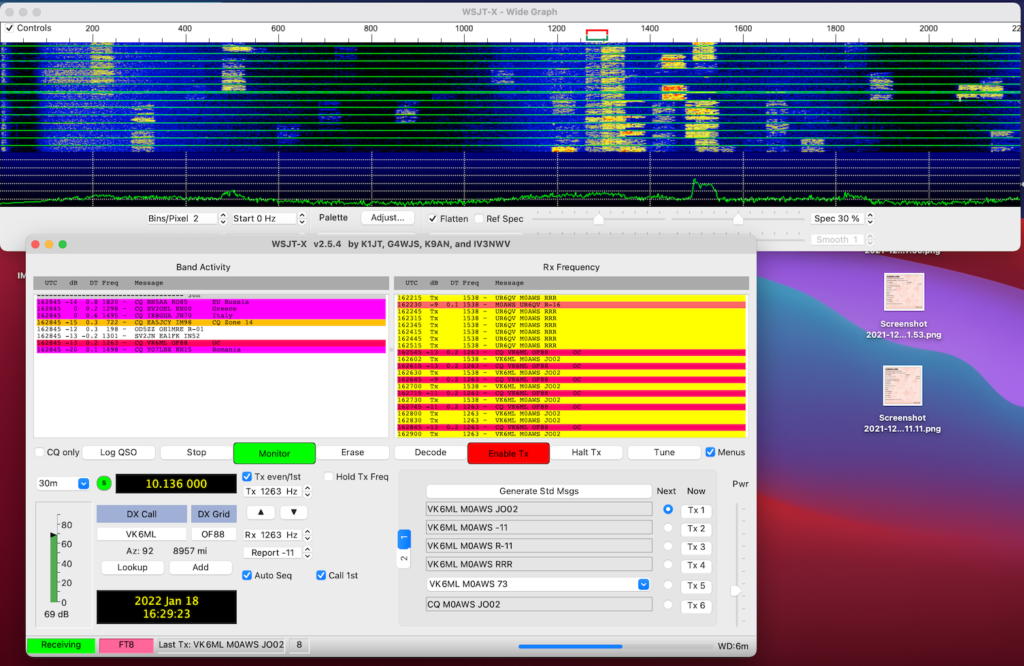
WSJT-X FT8 mode on the 30m Band

Connecting my MacBook Pro to the Yaesu FTDX10 I soon had WSJT-X FT8 mode running and started working a few stations. I found I needed to reduce the output from the Apple MacBook so that the ALC on the radio barely moved, this tidied up the transmitted signal and ensured I wasn’t splattering. Setting the radio O/P to 10w my first contact was into Cyprus, followed by a couple of contacts into Ukraine.

One thing I did notice was how strong many of the signals were. I’m sure some operators are using huge power levels on the FT8 part of the band with some of the signals +10db or more over S9. FT8 is supposed to be a weak signal mode, there really is no need for huge power levels. The funny thing is, many of these high powered stations are heard by DX stations but, they don’t hear the them coming back to them, classic case of shouting louder than they can hear. There really is no point being heard if your station isn’t capable of hearing the replies coming back.

I’d forgotten how good my Delta Loop antennas are, super quiet on receive and great for finding weak signals on the band.

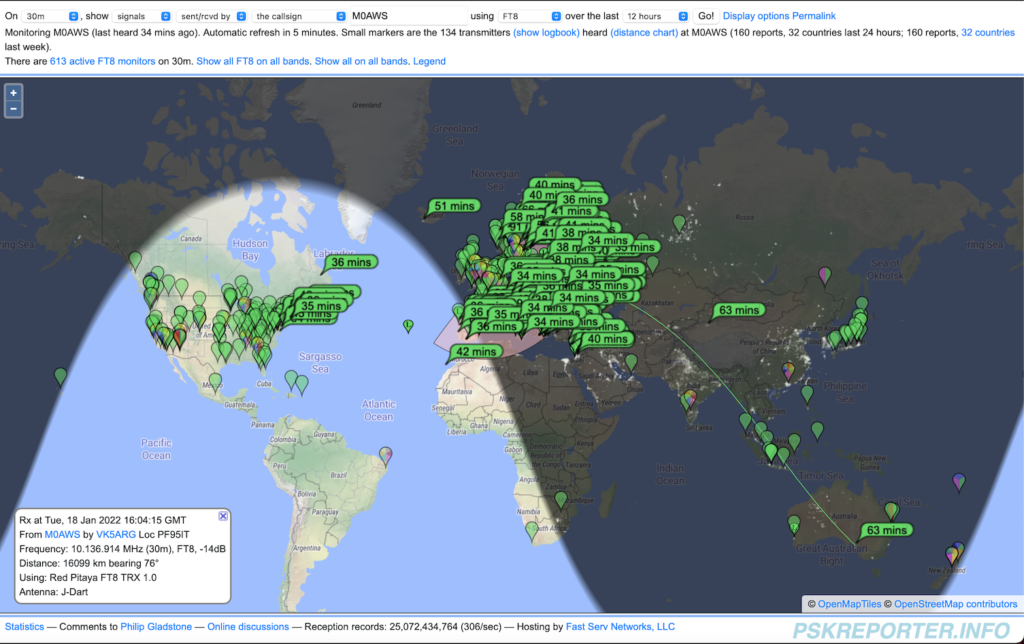
I checked the PSK Reporter site to see where I’d been heard and was pleasantly surprised to see I was heard in Australia! I did call an Australian station but, never got a reply from him, so it was great to get confirmation that my signal was making the trip.

PSK Reporter showing where my signal was heard

Due to the direction of my garden the antenna is beaming north west / south east, long path to Australia. It’s amazing how 10w of RF can cover almost 9000 miles!

So what next?

Well, I need to purchase some coaxial cable as the bits I have from France have gone stiff/brittle and really are past their shelf life.

I also need to buy some wire to start making some antennas. I’m going to put together a top loaded vertical for the 160/80/40m bands and some delta loops for the higher bands.

I’m also going to make some end fed half wave verticals for 20m and upwards.

Lots to do, if only the weather would improve!

More soon …