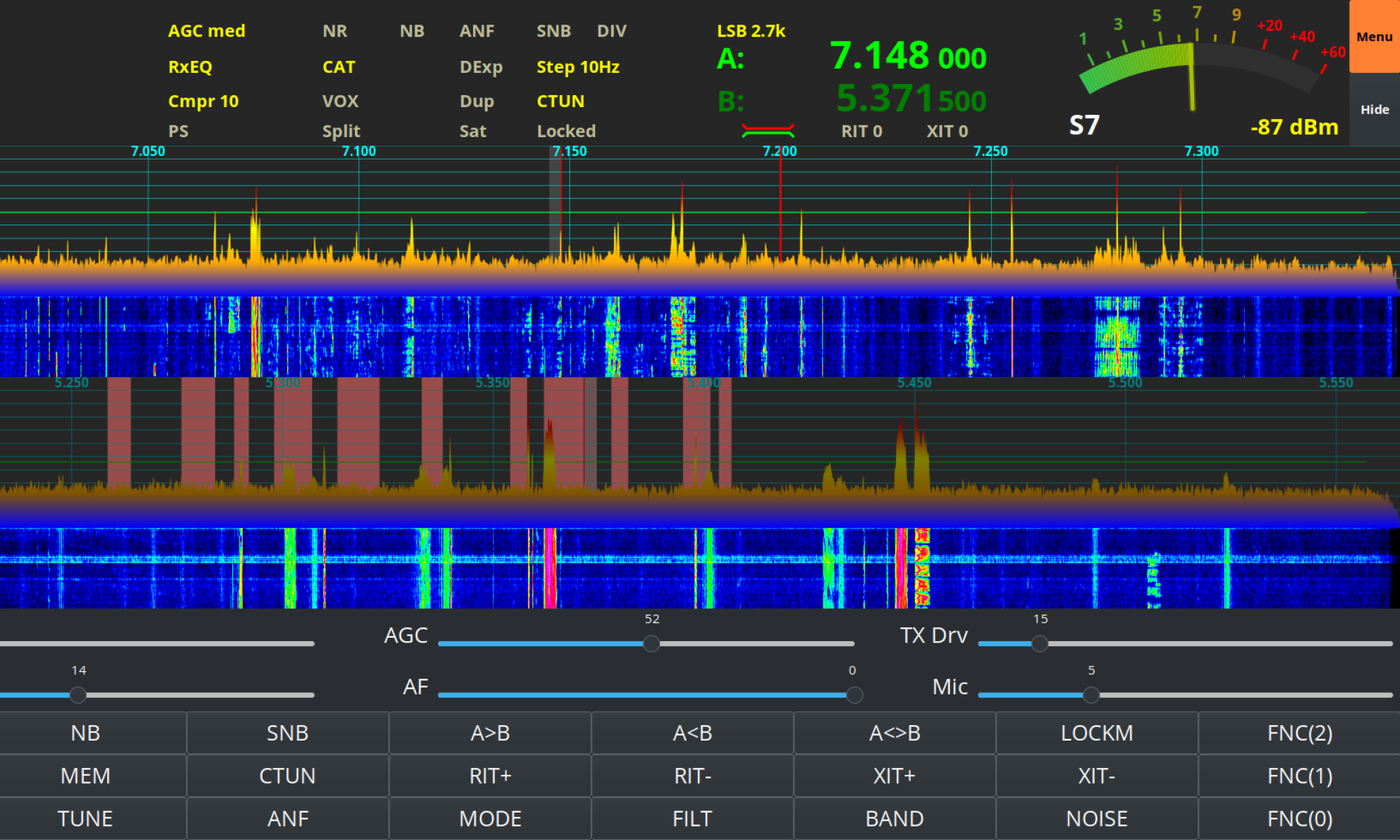
Hermes Lite 2 Audio

I often get unsolicited good audio reports whilst using my Hermes Lite 2 (HL2) on the HF bands with people asking what settings I am using so, I thought it was time I put together an article on the subject.

I use the DL1YCF enhanced fork of PiHPSDR to drive my HL2, a great OpenSource SDR software package that supports many SDR radios including some very high end, expensive models.

PiHPSDR is extremely configurable via it’s well laid out menu system. It’s possible to change the settings on almost everything which, when combined with really good hardware like the HL2 gives the operator the ability to create an extremely high spec transceiver at a fraction of the price of the typical black box commercial offerings.

Starting at the beginning of the transmit audio chain the first settings to be changed are in the Transmit (TX) menu.
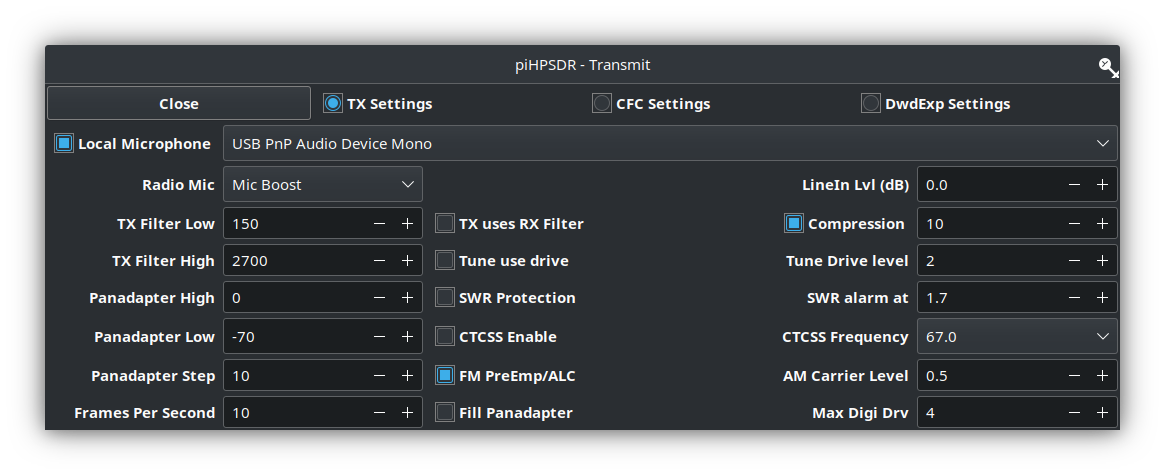
M0AWS Transmit filter settings

Using my Sennheiser headset I found I needed to set the Radio Mic setting to Mic Boost. This increases the audio level so that it drives the radio properly. It’s important to make sure that boosting the audio doesn’t cause distortion though.

Next I set the TX Filter Low to 150Hz. This ensures I don’t have that nasty bass sound that you hear often on the HF bands today.

The TX Filter High is set to 2700Hz. This gives me a transmit filter width of 2550Hz which is well within the 2700Hz standard for the HF bands.

I also set the compression level to +10dB to increase the average talk power of the audio.

Next in the transmit audio chain is the TX Equalisation. The PiHPSDR software has a very good software defined Parametric EQ menu that provides all the audio tailoring capabilities any HAM operator will ever need.

Having watched many videos by the great Bob Heil, K9EID (SK) I understand that all the articulation in the voice is around the 2500hz range. Today on the HF bands you often hear bass heavy audio that sounds muddy and horrible. This is exactly the type of audio I don’t want to have so, to this end I have adjusted my EQ settings such that the articulation is accentuated to increase clarity and give a little pep to my rather dull sounding voice.
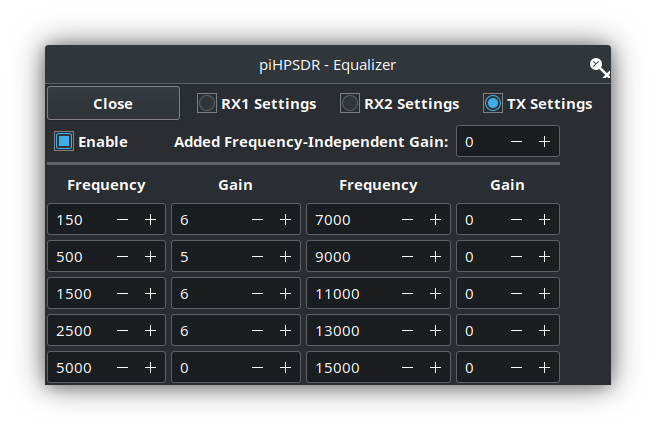
M0AWS PiHPSDR Transmit EQ Settings

Since the transmit filter width is set from 150Hz to 2700Hz there’s really no point in making EQ adjustments outside of this range. As show above I have made the following changes to the transmit EQ settings in PiHPSDR:

FrequencyGain
150hz+6dB
500Hz+5dB
1500Hz+6dB
2500Hz+6dB

The final part of the audio setup is the Mic Gain, I keep this set at 5. This keeps the audio nice and tidy with no IMD.

My HL2 TX Drive is set so that it puts out a maximum of 500mW, this is enough to drive my Xiegu XPA125B amplifier to 100W.

With these settings I find that the Sennheiser headset, PiHPSDR software and the Hermes Lite 2 combination gives me a great signal on all the HF bands.

I hope this helps all those who have asked how my audio is setup and have been so impressed by this great little radio.

More soon …
The Art of Articulation

Since I’ve been using my Icom IC-705 on the QO-100 satellite I’ve been getting no end of unsolicited great audio reports with one Op even saying I have the best audio he’s ever heard on the satellite.

Most people are surprised when I tell them that I am using the stock fist mic that comes with the radio. It’s nothing special, in fact it’s rather cheap and plastic, not particularly good quality however, it does seem to have a good sounding mic insert.

The other great thing about the IC-705 is that it has a two channel parametric equaliser built into the radio. Many people don’t realise this and miss out on the massive improvement they can make to their transmitted audio with just a few simple adjustments.

The stock fist mic has a very flat response across the audio frequency range out of the box and doesn’t sound particularly inspiring. Many see this as a negative and often just replace the mic with either a headset (probably from Heil), a boom mic (again probably from Heil) or another, better quality fist mic. All of these options cost varying amounts of money when in reality none of them are necessary.

Starting from a flat audio response is actually a good thing as it makes the equaliser adjustments more pronounced, making it easier to adjust the settings to suit your voice.

We all have different voices but, there is one thing that is pretty much the same for everyone and that’s the frequency range in which the articulation of the words and sounds we make can be found. It’s this part of the voice that is often lacking when we struggle to understand what the DX station is saying.

It’s become common place on the HAM bands these days for stations to boost the bass frequencies and reduce the mid and high frequencies with the net result of a horrible bass ringing sound and muddy mid range often making it very difficult to understand what is being said.

Having spent some considerable time watching the great videos on audio from the late Bob Heil, K9EID it’s clear that the most important frequencies to enhance are those around 2.5khz as this is where all the articulation is in the human voice.

To this end I set about setting up the audio on my IC-705 QRP radio so that my voice sounded such that it is easy to comprehend even in the most difficult of situations on air. This doesn’t mean that it has to be very harsh and overly bright, quite the opposite in that to be heard clearly in all conditions on air one’s audio needs to be balanced across the frequency range with an enhancement in the 2.5Khz frequency range.

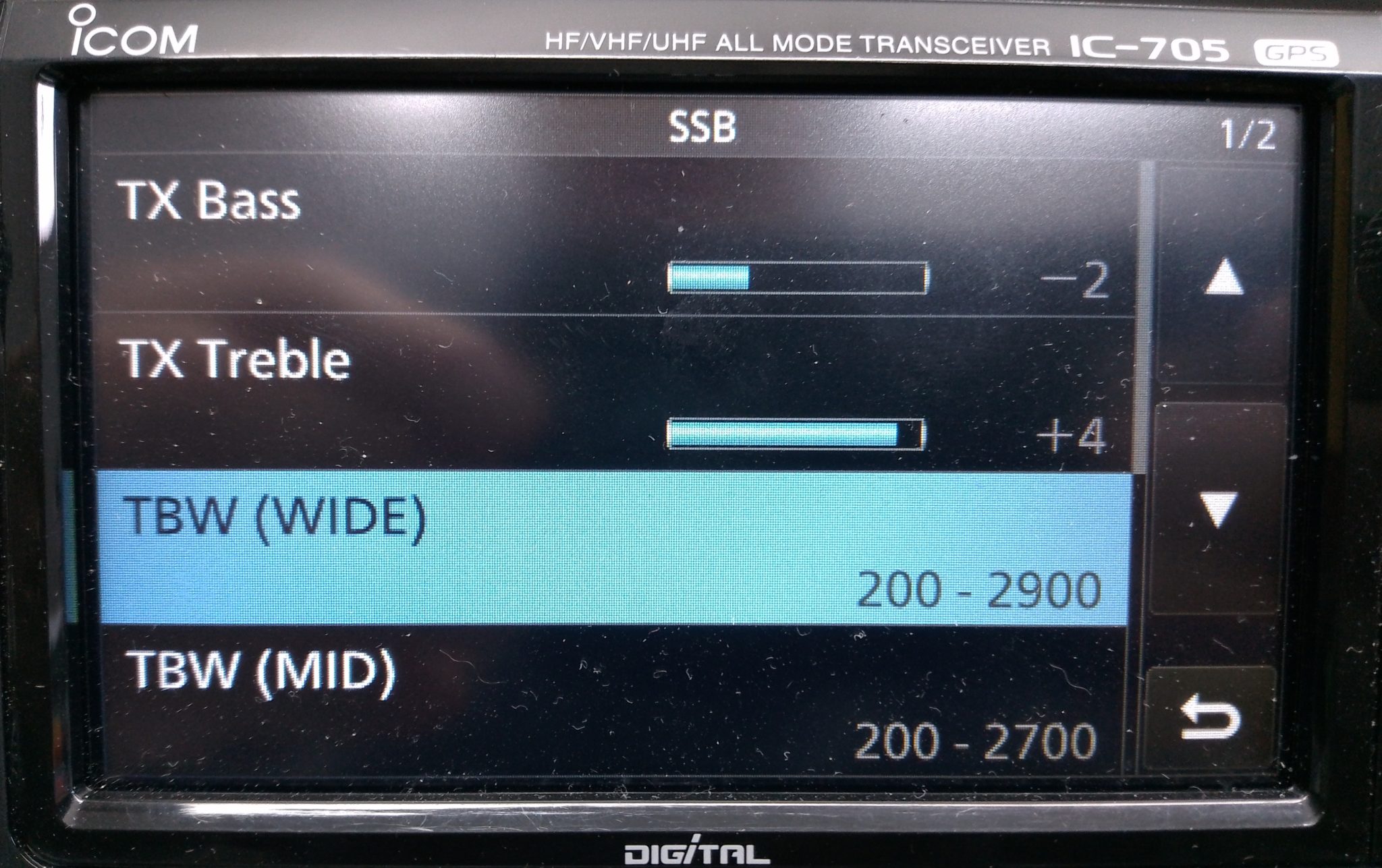
M0AWS IC-705 Transmit audio settings - part 1
M0AWS IC-705 Transmit audio settings – part 1

To reduce the unwanted, muddy bass the first thing to do is change the transmit bandwidth for the “Wide” setting to 200-2900Hz. This will cut off the bottom 100Hz from the voice reducing the overall bass output from the standard fist mic that comes with the radio. This will ensure a 2700Hz wide SSB signal, the recommended max for QO-100 operations and the preferred bandwidth on the HF bands.

On top of this I made a further reduction of 2dB on the TX Bass setting to help balance out the overall audio response of the mic insert.

Next I set about enhancing the higher frequency response of the mic insert and found that it required an increase of 4dB to bring out the articulation of my voice. This enhanced my audio considerably compared to the standard output from the fist mic and improved the intelligibility of my voice considerably, especially in difficult band conditions.

To complete the setup I set the compression to 3 and mic gain to 35 so that the overall drive level is increased slightly giving a greater average output from the radio.

M0AWS IC-705 Audio Settings - part 2
M0AWS IC-705 Audio Settings – part 2

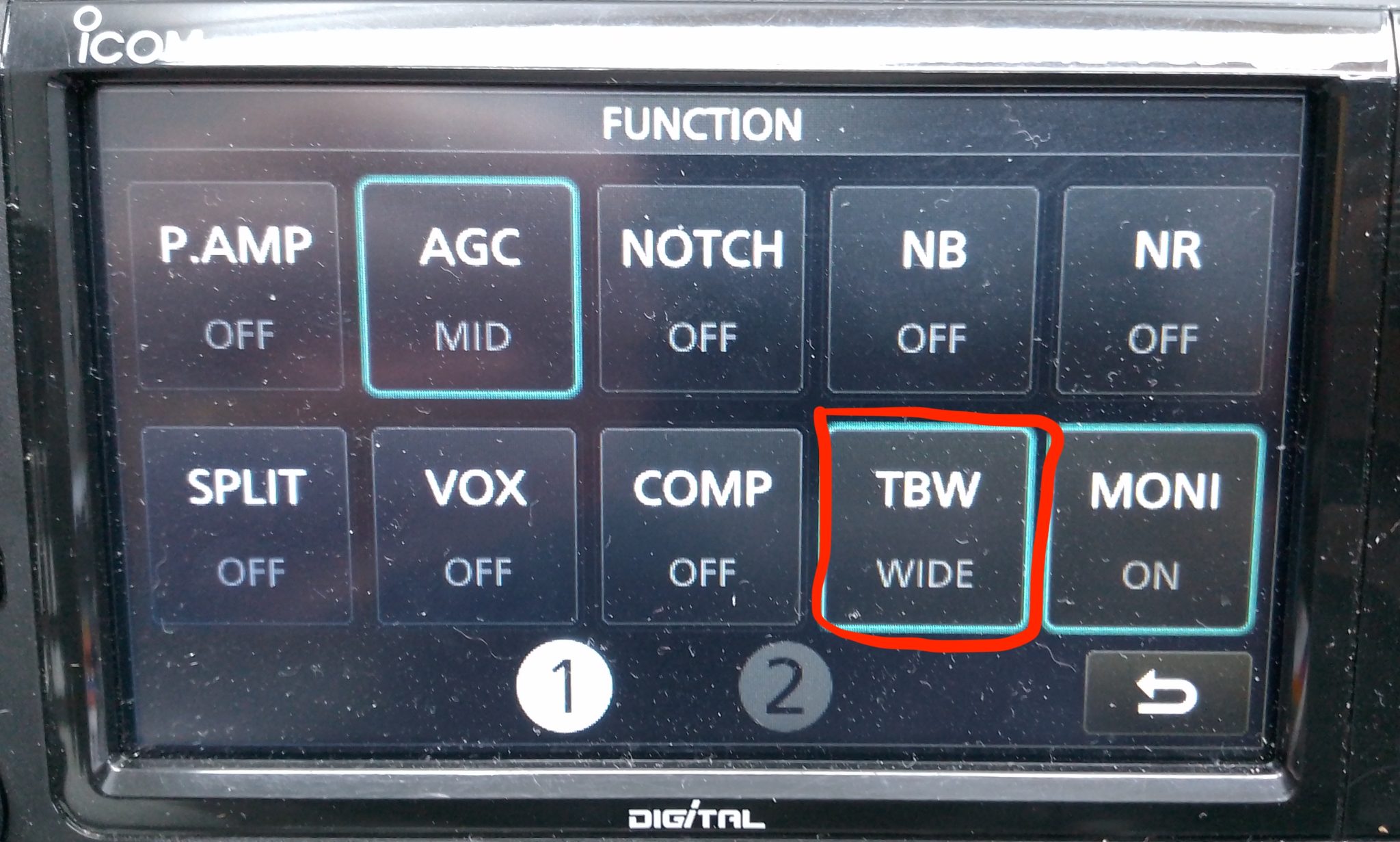
Once I’d got the audio setup correctly I enabled the configuration by setting the Transmit Bandwidth (TBW) to the “Wide” config in the IC-705 Function menu so that the correct settings were made active.

Ever since making these relatively easy changes I have had no end of unsolicited great audio reports from stations asking me what mic I am using and how I’ve managed to get such good audio from the IC-705. Many are surprised that I am using the OEM fist mic that comes with the radio and I’m sure there are those who don’t believe me!

Of course all voices are slightly different and these settings may not be perfect for your voice but, all those that have tried these settings have told me that their audio sounds better than ever and that DX stations often comment on how good their audio is.

I also went through the same exercise with my Yaesu FTDX10 with it’s standard fist mic and again achieved excellent results with it’s 3 channel parametric equaliser. I’ll go through the somewhat more complicated setup for the FTDX10 in another article soon.