Let me start this article by confessing that I hate Snap on Linux!
The whole idea that you’d need a container type environment to install an application on a Unix system is very far from where I want to be.
It annoys me that snaps are updated automatically too. I know you can disable this but, I shouldn’t have too. App’s should only get updated when I want to update them, not before.
What I really hate is the fact that the Snap back end system is proprietary and owned solely by Canonical, the Ubuntu people. This goes against my OpenSource ethos.
Sadly I had to install Snap to get the Signal messenger app installed on my RaspberryPi 5 desktop computer. App’s installed via Snap are extremely slow to start, run slow and are heavy on resources. Snap also mounts a whole bunch of dependency Snaps via loop devices to make the app work. Snaps make a real mess of your system.
The final straw that broke the camel’s back for me was when Snap did an automatic upgrade to Signal to a version that has a serious bug in it causing it to crash a minute or so after startup. I initially reverted to the previous version to get it working again but, sure enough Snap did another auto-update and broke it again.
This time I couldn’t revert back to the previous version as Canonical, in their infinite wisdom decided to remove the previous version of Signal from their Snap store!
At this point I removed the Signal Snap from my computer, along with all the “hanger on” snap packages that were clogging up the RaspberyyPi 5 and finally did a complete purge of snapd using dpkg to get rid of all the horrendous snap mount points on the file system.
After a reboot I then went hunting for the Signal messenger app source code. Looking through the code it’s not a 5min job to get it compiled on a RaspberryPi and so I followed a few of the forked versions to see if someone had already done all the hard work for me.
After disappearing down a few Rabbit Holes I eventually stumbled into the world of Pi Apps.
Pi Apps is a neat little app that provides access to the “most popular app store for RaspberryPi computers”. It’s 100% free, OpenSource and written in shell scripts. Perfect!
Installing the “Pi Apps” app is straight forward and only takes a few moments.
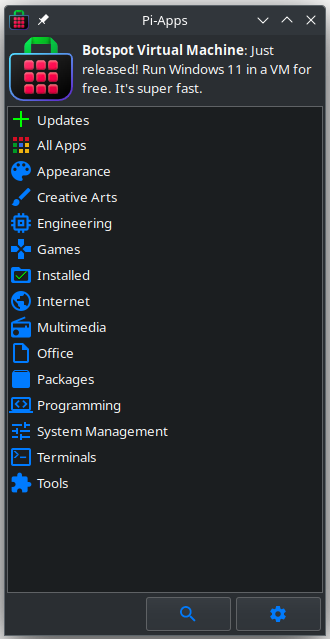
Opening Pi-Apps I found a multitude of OpenSource apps all ready to be installed at the click of a button. In no time at all I’d found Signal and had it installed without getting anywhere near the dreaded Snap.
The version of Signal available at the time of writing this article is v7.39.0 which is fine as this is a stable, bug free version that works reliably.
If you’re using a RaspberryPi computer I can highly recommend you install the Pi-Apps app to enhance your collection of great OpenSource programmes to make your little raspberry flavoured buddy even more useful.
More soon …