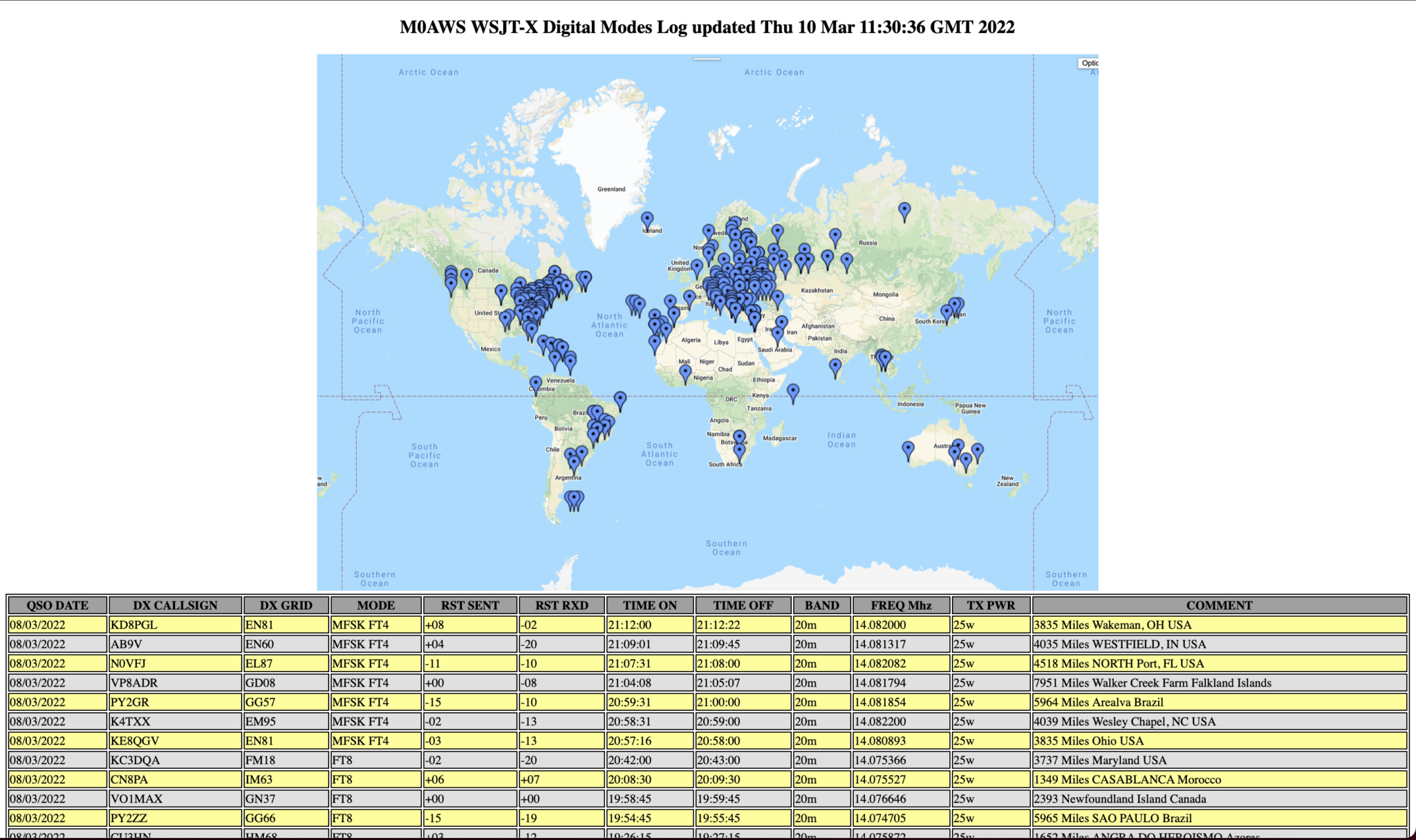
Following on from the adi2html v0.5 release I’ve now added a little more code to include a map of the contacts detailed in the wsjtx_log.adi file so that there is a visual representation of the data included in the webpage. (Map must be generated externally and JPEG/GIF/PNG uploaded to website to be included in the webpage).
When I lived in France (F5VKM) I was totally focused on the low bands. I spent years trying to get the Falkland Islands on 160m. Now living in the UK with a typical small garden I no longer have the luxury of big antennas. Currently I’ve just got my EFHW Vertical for 20m at the end of the garden.
Today I heard the Falkland Islands on 20m for the first time since setting up the new station, I was amazed to say the least.
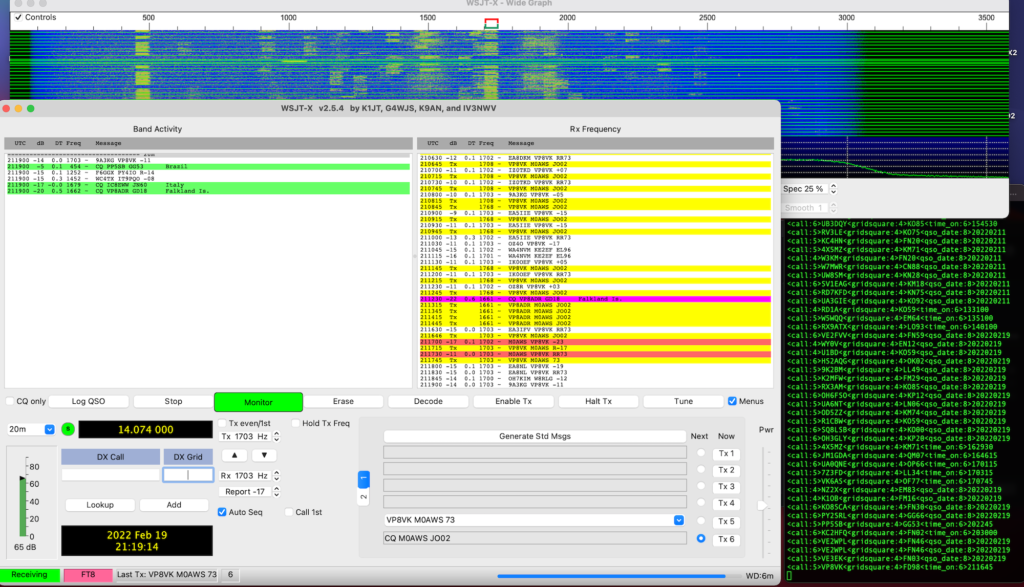
WSJT-X FT8 working VP8VK with just 25w
I decided to give the two stations a call, didn’t get an answer from VP8ADR but, VP8VK then popped up and I snuck in and got a quick QSO with just 25w.
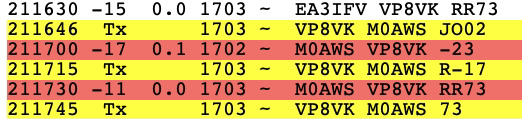
FT8 QSO with VP8VK
Working DX is so much easier on 20m than it is on 160m, I’m amazed!
-23dB is very close to the limit for FT8 but, it was enough to get a complete QSO and the Falklands in the log.
I also got VK6AS on 20m FT8 today, again with just 25w. This EFHW Vertical for 20m really is an excellent DX antenna, it’s perfect for the small garden too!
One of the things I’ve had issues with ever since purchasing the Yaesu FTDX10 transceiver is control of the audio chain via the USB connection on the rear of the radio.
The output from the radio into my Macbook Pro is just too high, WSJT-X is constantly pushed beyond the green zone and often into the red zone when monitoring FT8 signals with the AGC off. The only way to cure this is to keep the AGC on Auto which sometimes results in not hearing the very weak DX stations due to the AGC not reacting fast enough. Putting the AGC on fast causes the red line to be hit far too often once more.
Sadly, the USB Audio Codec doesn’t provide any volume adjustment on audio coming from the radio into the MacBook Pro thus, it’s just full volume all the way. This is a flaw in the codec design and really does need to be resolved long term.
Looking at the audio going the other way, that is from the MacBook Pro into the radio via the USB port fortunately there are gain controls available both on the MacBook Pro and on the radio itself.
Ever since venturing into the world of WSJT-X & FT8/4 I’ve had an issue with only being able to move the PWR slider in the WSJT-X up to the first marker at the bottom of the screen, anymore and the ALC on the radio goes off the scale instantly!
So yesterday I decided to investigate the audio chain into the radio more thoroughly and see what could be done about the levels.
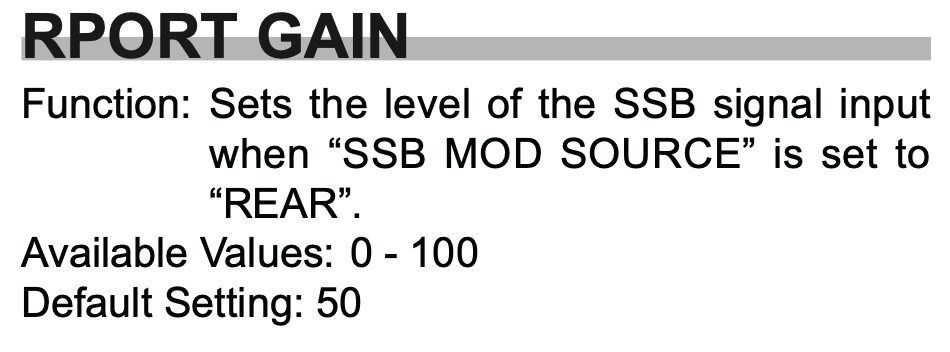
Looking at the radio manual I found that there is an RPORT GAIN setting in the menu system that can be used to alter the amount of gain applied to the incoming audio signal on the USB port in the radio.
FTDX10 Rport Gain entry in the manual
As detailed in the manual, the default setting for this is 50 in a range of 0 to 100. So that’s a 50% increase in gain applied to the incoming audio at the radio end, that’s quite a boost! (The gain is applied both in SSB and Data Modes)
I decided to experiment reducing this figure to see if it gave me greater control over the audio output from WSJT-X via the PWR control. This did indeed help however, there was still too much audio coming into the radio from the MacBook Pro and so I needed to look further along the audio chain.
Moving back onto the MacBook I opened the Midi App and took at look at the Output controls for the USB Audio Codec, sure enough this was set to max for both channels, not good.
Reducing the levels in the midi app started to make much more of a difference, I could now raise the audio level using the PWR control in WSJT-X without things immediately going wild and could now control the levels with a far greater level of granularity than ever before.
After much tinkering I eventually found the levels whereby I could drive the rig to the selected output power (20w) without the ALC going off the scale and the signal becoming horribly distorted, there was calm in my audio chain once more.
So what settings did I settle on?
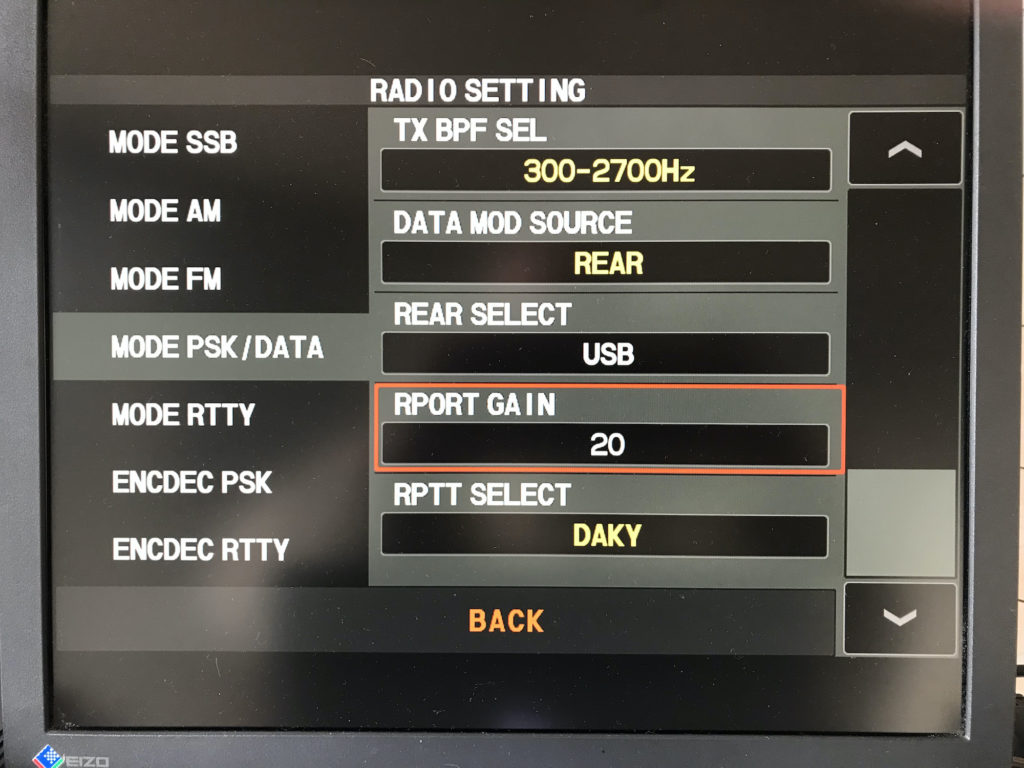
On the radio itself I wound down the RPORT GAIN setting from 50 to 20, this reduced the amount of gain applied to the audio coming in on the USB port considerably and helped to tidy up the FT8 signal.
FTDX10 RPORT GAIN Setting reduced from 50 to 20
It’s great that there is the facility on the radio to reduce the gain on the inbound audio signal, if only Yaesu would do the same for the outbound audio level.
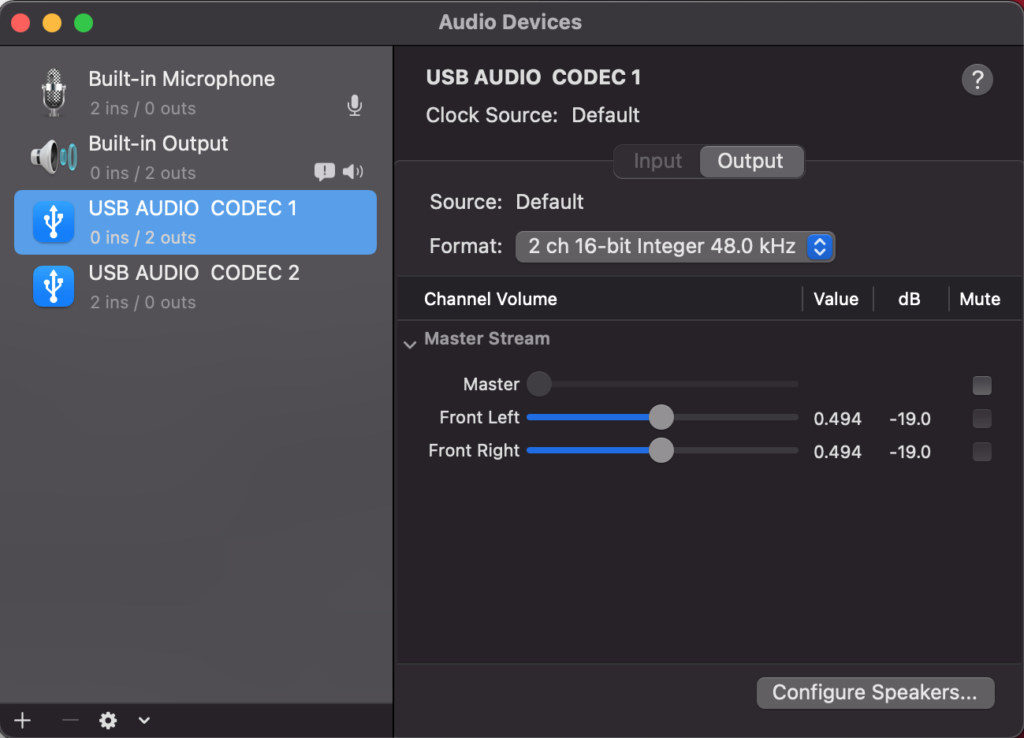
Next, on my MacBook Pro via the Midi app I reduced the output level on the USB Audio Codec from the default maximum down to 0.494 (-19). This stops the audio level from being too high going into the radio and removes all distortion from the resulting signal.
Midi App on Macbook Pro showing reduced audio output
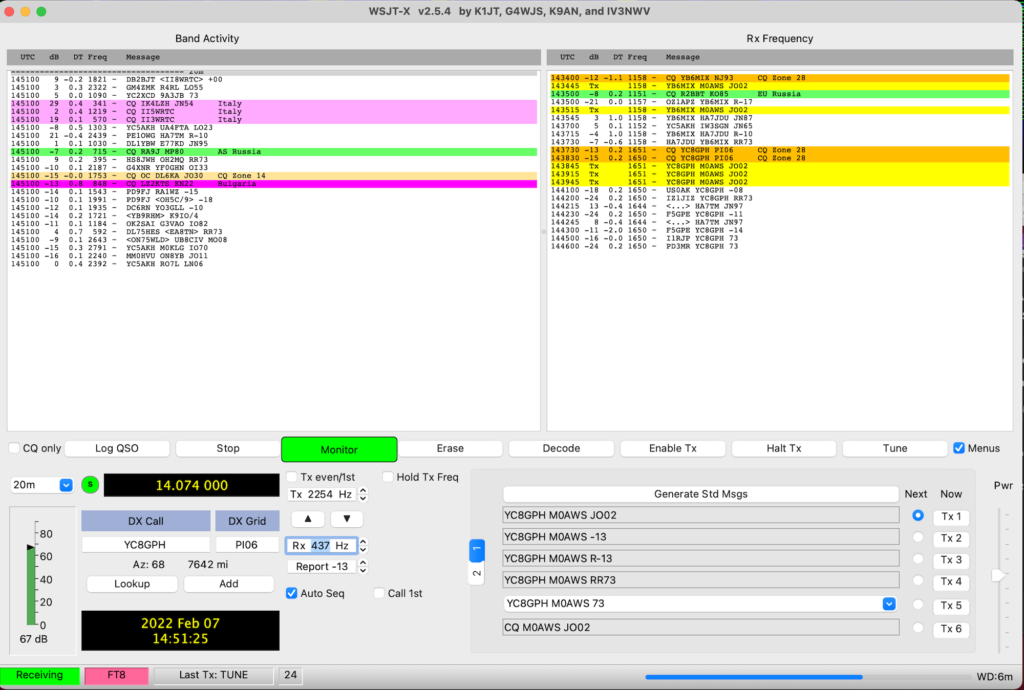
Once these small changes have been made it becomes necessary to raise the PWR level in the WSJT-X app to roughly the centre position. At this point the radio gets a clean, distortion free audio input whilst driving the radio to the full 20w output with no movement on the ALC whatsoever.
I found I could move anywhere on the frequency spectrum on FT8 without any of the levels changing and with the ALC not moving whilst the radio delivered the full 20w output.
I also checked FT4 mode as it is an MFSK mode to see if these settings worked for it too and I’m glad to say it worked perfectly! (I also found I really liked FT4!)
WSJT-X with the PWR setting at roughly 50%
Altering the PWR level in WSJT-X doesn’t have the huge effect it had before and now it’s very easy to adjust the level without the ALC going off the scale in an instant.
It took me about an hour or so to get this just right but, it was well worth the time invested.
I hope this is of use to other Apple Mac computer users in the HAM community.
I completed the fine tuning of the 20m EFHW Vertical today, I got the SWR down to 1:1 at 14.10 Mhz. This gives me a perfect match for the CW and digital section of the band with the SSB part of the band not exceeding 1.4:1 at 14.350.
I ended up removing 34.5cm of wire from the original antenna length to get the resonance where I wanted it. This was caused mainly by the extra inductance added into the circuit by the 49:1 Unun. This is to be expected and perfectly normal when feeding an antenna via an impedance matching transformer.
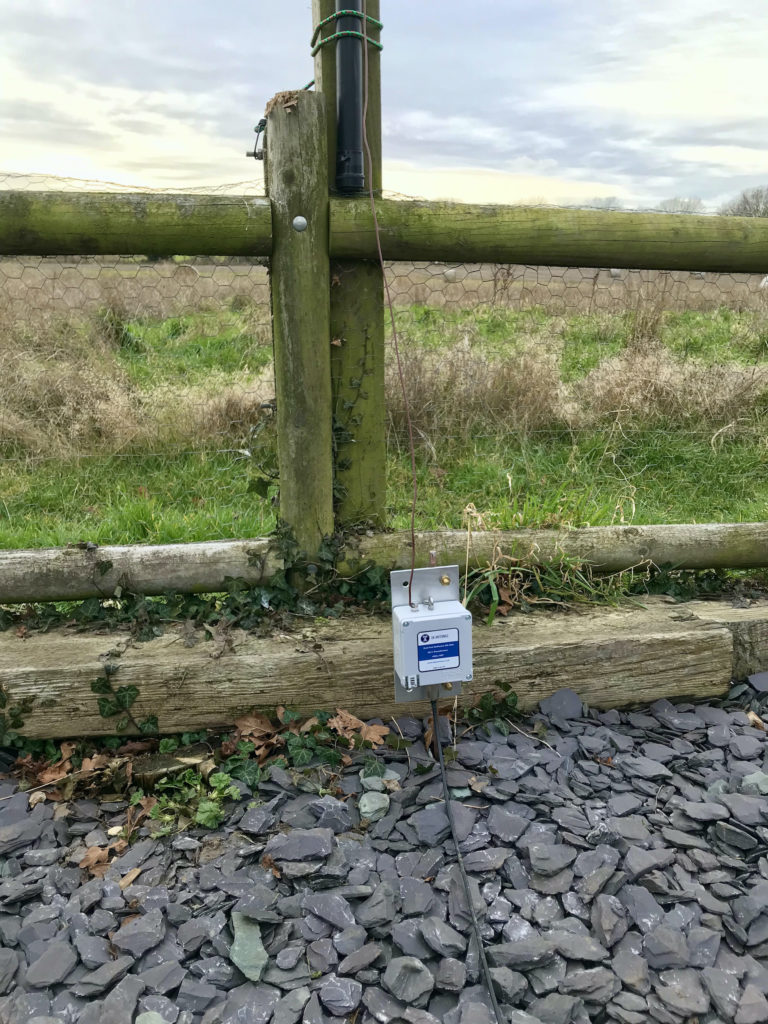
I bolted the 49:1 Unun directly to the earth rod, this way it’s got a solid earth connected directly to it to keep the resistance to a minimum. (The metal mounting plate is also the earth termination point).
49:1 Unun mounted on earth rod directly
I spent some time today chasing the DX on the 20m band using the FT8 digital mode.
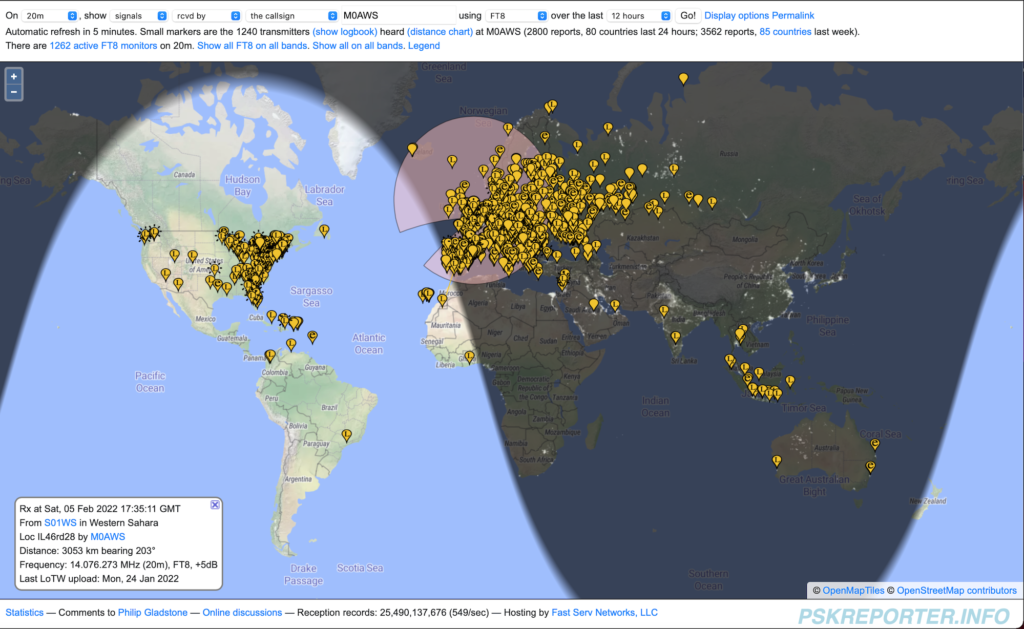
The fun started with VK2LAW in Sydney Australia, followed by E25ETT in Thailand, KP4CAR in Puerto Rico, 9G5AR in Accra Ghana and The Sahrawi Amateur Radio Club station S01WS in Western Sahara. A nice mix of stations dotted around the world.
PSKReporter map showing all the stations that I heard on 20m today
I like to keep an eye on the PSKReporter site whilst on air to see what I’m hearing. As you can see I heard stations from the West Coast USA right across to New South Wales in Australia and down south as far as Brazil. The 20m EFHW Vertical antenna and Yaesu FTDX10 radio combination really does have good ears
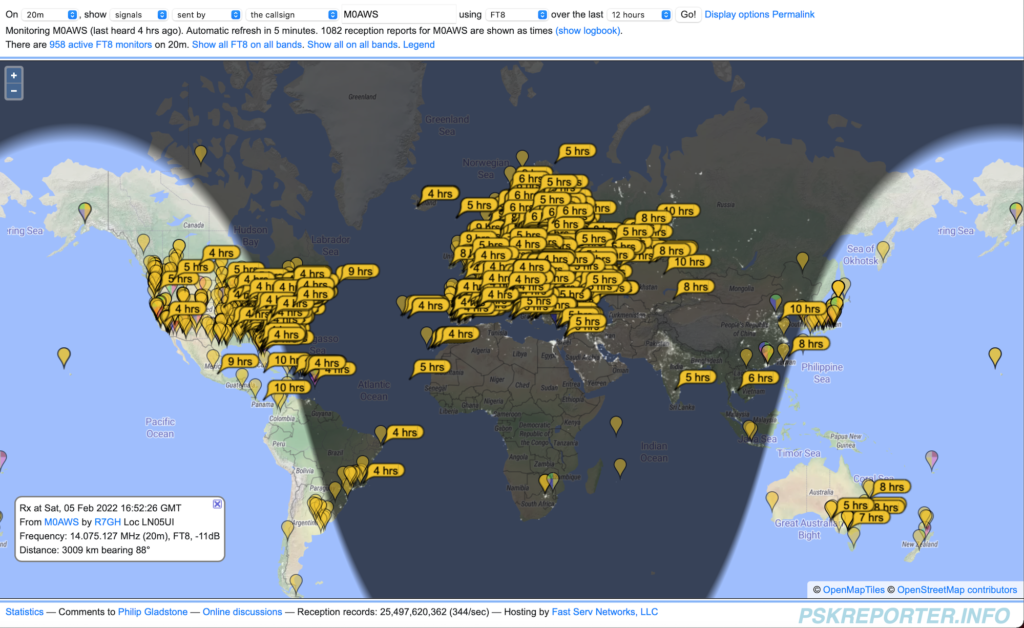
As for being heard, well it’s a similar story, below is a map showing all the stations that heard me as reported on the PSKReporter website.
Stations that heard M0AWS on 20m FT8
One again, great global coverage from the antenna and transceiver combo with only 20w being used for most contacts. (25w used to break some of the pileups!)
Overall I’m really pleased with the performance of the antenna, for such a simple design it works exceedingly well. One huge advantage of a half wave over a quarter wave antenna is that the point of max current is 50% along the antenna’s length, on the 20m band EFHW Vertical this puts it some 5m above the ground lowering the angle of take off and making it a great DX antenna.
If you’ve not got a lot of space but, want to work the DX on 20m then I highly recommend you give one a try, I’m sure you’ll be amazed at how well it performs.
Can’t wait to get a 40m EFHW Inverted L up next!
Information as to why it’s best to keep the feed point at ground level for this antenna is here.
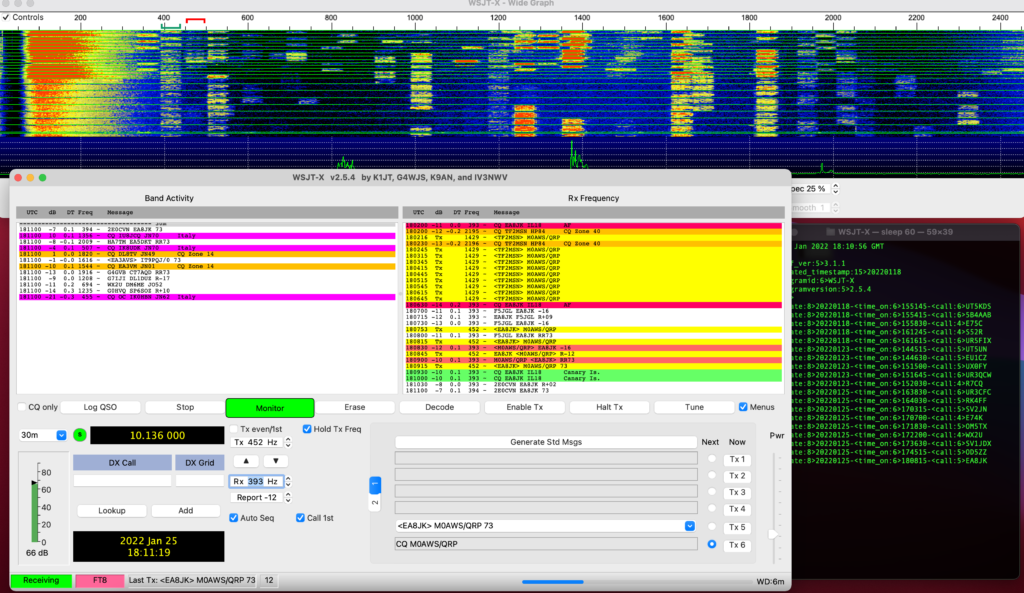
I spent yesterday evening on the 30m band running WSJT-X in FT8 mode whilst getting to know the new radio. I must say I am impressed with the Yaesu FTDX10, the receiver really is extremely good at pulling out the weakest of stations.
WSJT-X in FT8 mode running on my MacBook Pro
I have a very simple setup at the moment, just the one antenna for 30m currently so I don’t have a lot of bands available. Hopefully this will change in the coming months as I work on building a new multi band antenna for the station.
I’m still getting to know WSJT-X and FT8, it’s a new mode for me and quite different to how things were 15 years ago when I was last active.
With a little perseverance I soon got the hang of it and was working stations with ease. I’m very much a wait and pounce type DXer, so my QSO turn over is low but, I get the stations I want to work rather than just a multitude of European stations who are all on my doorstep.
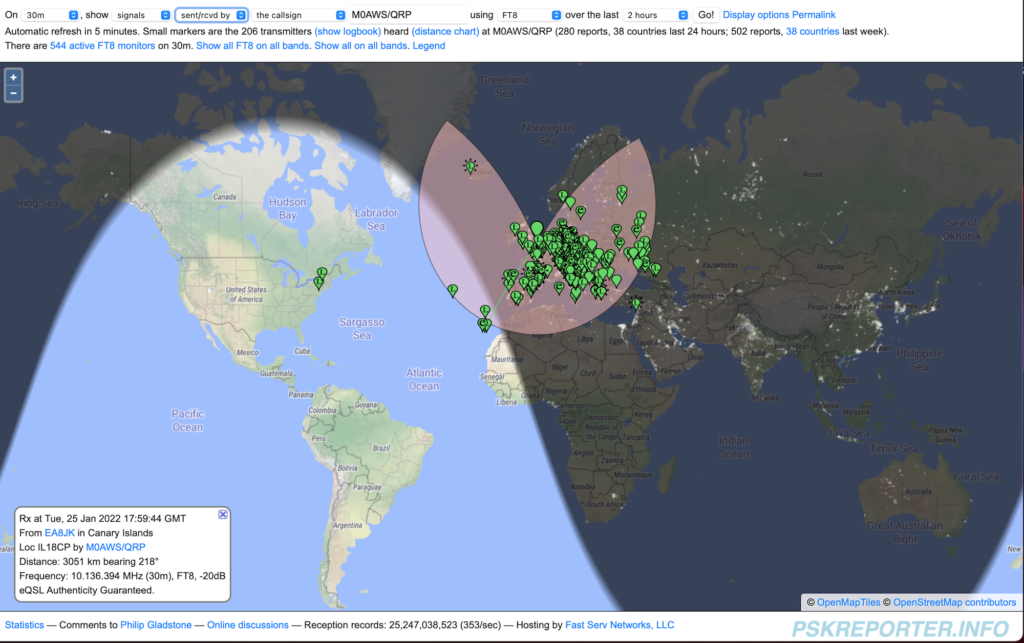
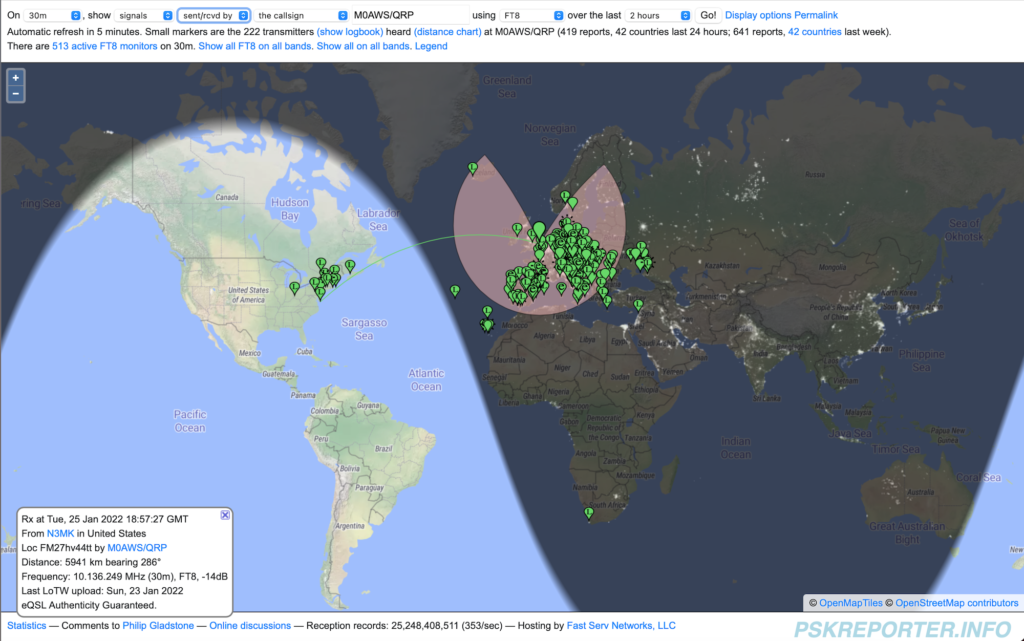
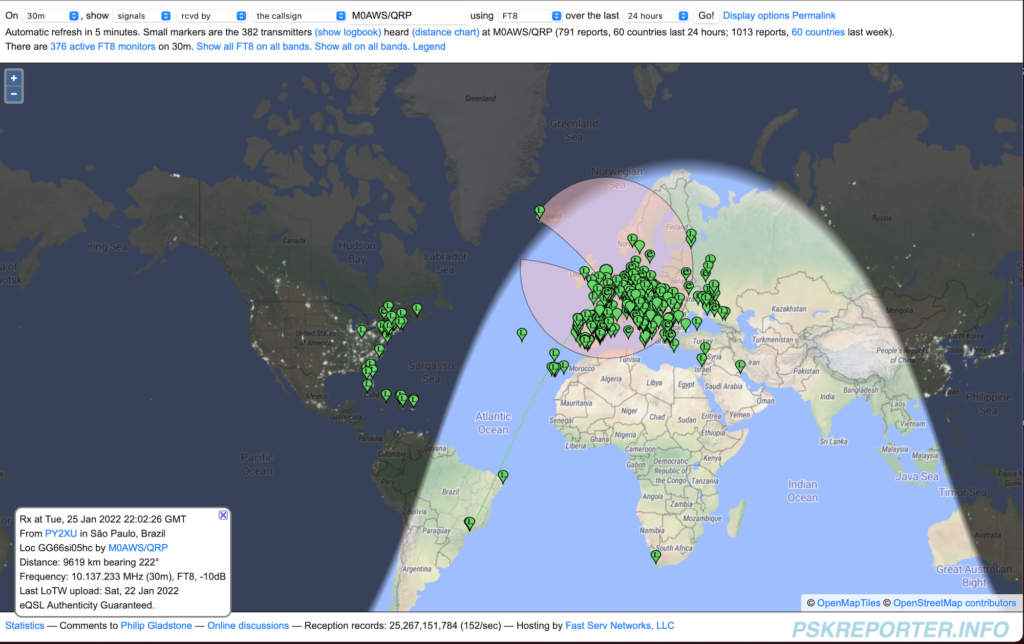
It was interesting to watch the band conditions change as the grey line moved across the Atlantic. One by one countries further west started popping up on the band.
30m FT8 Early Evening view
At 18:00GMT PSKReporter was showing mainly the multitude of European stations running FT8 on 30m with the Azore and Canary Islands starting to appear along with a couple of stations from the East Coast USA.
30m FT8 19:00GMT
As the grey line continued west more and more DX stations started to appear including a station in South Africa. I worked a bunch of stations in the Ukraine and Russia and then started picking off the stations in the USA one by one.
30m FT8 all stations heard (Screenshot taken next day)
By the end of the evening there were stations from South America and the Caribbean coming through. I spent over an hour trying to work CO8LY in Cuba, he was coming in at -10dB at my end but, sadly he never heard my 15w signal. I did try splitting the RX and TX frequency in WSJT-X so that my signal was to the side of the pileup but alas I never got through. Later in the evening I found CO8LY calling CQ over and over but, once again he never heard my replies. A real shame as it’s rare to hear Cuba over here on the East Coast of the U.K.
At 22:30GMT I closed the station down and headed to bed, I didn’t work a huge number of stations but, I had a lot of fun chasing the ones I wanted to get.
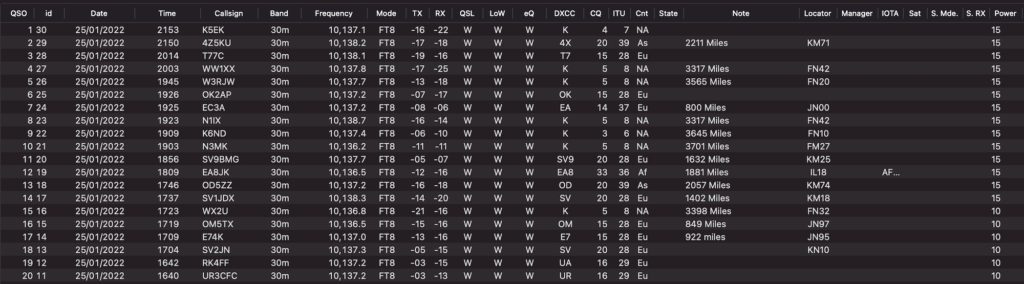
It’s interesting to note that the closest stations worked was 800 miles away, I think that is the first hop for my 30m Delta Loop Antenna. With the antenna being so quiet on receive and the FTDX10 having such a good receiver, it was very easy to pick out the stations 2000 miles or more away from my QTH. Most of the time I was able to exchange signal reports with stations that I called. It’s impressive to be able to exchange reports with stations that are -18dB or more below the noise level.
RUMlogNG List of stations worked on 30m FT8 mode
It was nice to get into Lebanon and Israel, two countries that have always been difficult to get into from my U.K. QTH.
A total of 20 stations worked, not a huge count but, it gave me some time to get used to the radio and it’s settings.
I also had a tune around 40m, the FT8 section was packed with stations from all over the world. I can’t wait to get onto 40m, it’s one of my favourite bands and I’m hoping to be able to work some good DX with QRP power levels.
I also listened on 80m and 160m, both were very active with mainly European stations on FT8 and SSB.
With my roll of coax arriving today I’l spend some time putting together a new coaxial run to the antenna and start working on an LC tuning unit for the new vertical I’m designing.
I had a fun couple of hours this afternoon. I found my 30m band Delta Loop antenna packed away in the loft, got it out and put it up in the garden, 1.2:1 SWR across the band and I was soon listening to Morse conversations on the band.
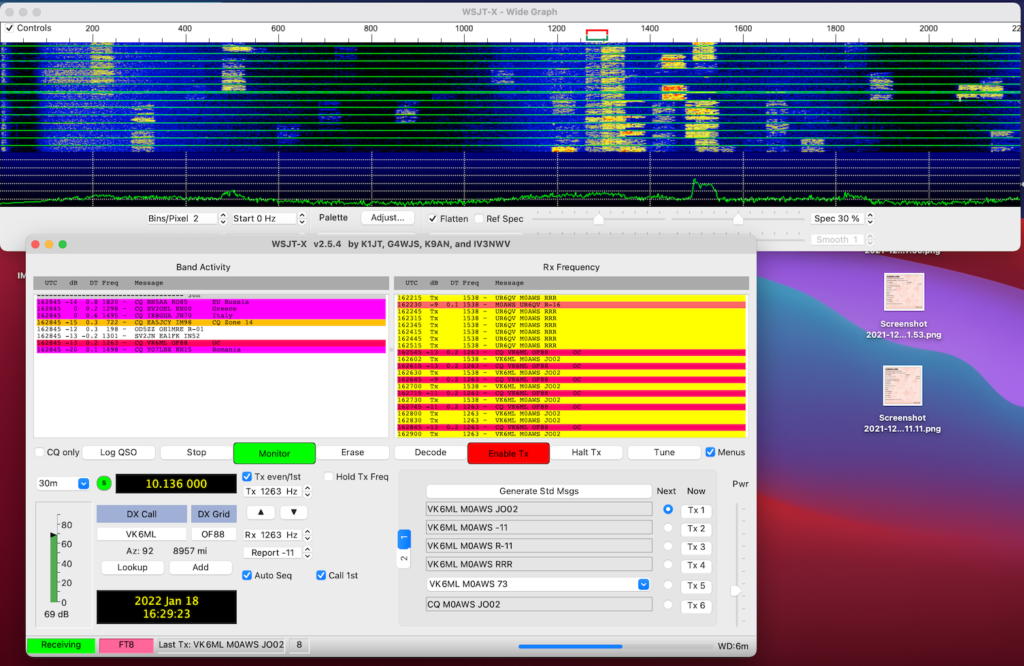
WSJT-X FT8 mode on the 30m Band
Connecting my MacBook Pro to the Yaesu FTDX10 I soon had WSJT-XFT8 mode running and started working a few stations. I found I needed to reduce the output from the Apple MacBook so that the ALC on the radio barely moved, this tidied up the transmitted signal and ensured I wasn’t splattering. Setting the radio O/P to 10w my first contact was into Cyprus, followed by a couple of contacts into Ukraine.
One thing I did notice was how strong many of the signals were. I’m sure some operators are using huge power levels on the FT8 part of the band with some of the signals +10db or more over S9. FT8 is supposed to be a weak signal mode, there really is no need for huge power levels. The funny thing is, many of these high powered stations are heard by DX stations but, they don’t hear the them coming back to them, classic case of shouting louder than they can hear. There really is no point being heard if your station isn’t capable of hearing the replies coming back.
I’d forgotten how good my Delta Loop antennas are, super quiet on receive and great for finding weak signals on the band.
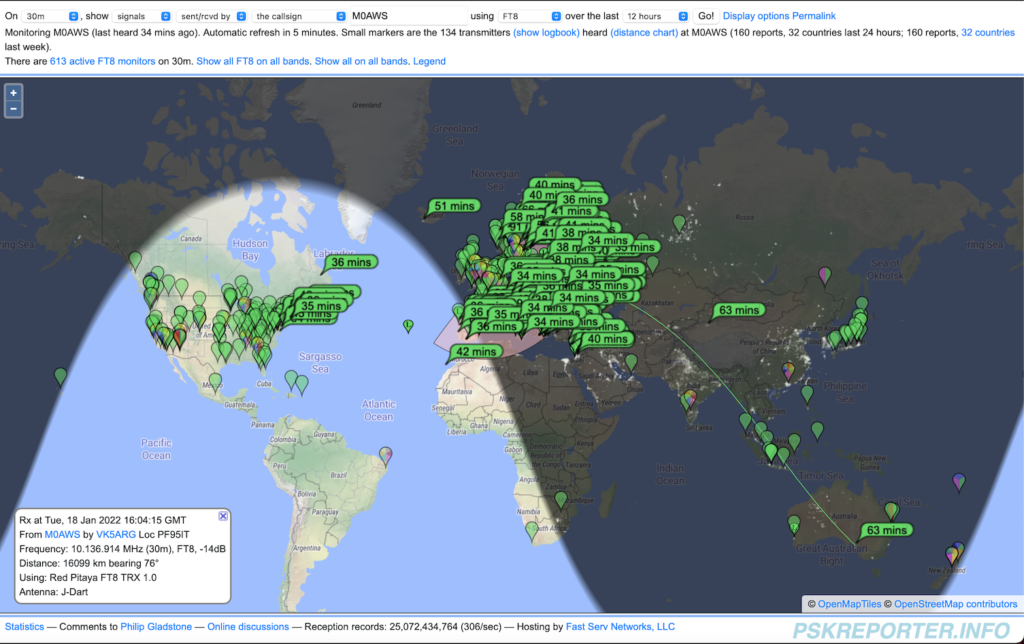
I checked the PSK Reporter site to see where I’d been heard and was pleasantly surprised to see I was heard in Australia! I did call an Australian station but, never got a reply from him, so it was great to get confirmation that my signal was making the trip.
PSK Reporter showing where my signal was heard
Due to the direction of my garden the antenna is beaming north west / south east, long path to Australia. It’s amazing how 10w of RF can cover almost 9000 miles!
So what next?
Well, I need to purchase some coaxial cable as the bits I have from France have gone stiff/brittle and really are past their shelf life.
I also need to buy some wire to start making some antennas. I’m going to put together a top loaded vertical for the 160/80/40m bands and some delta loops for the higher bands.
I’m also going to make some end fed half wave verticals for 20m and upwards.
Lots to do, if only the weather would improve!
More soon …
We use cookies to ensure that we give you the best experience on our website. If you continue to use this site we will assume that you are happy with it.